
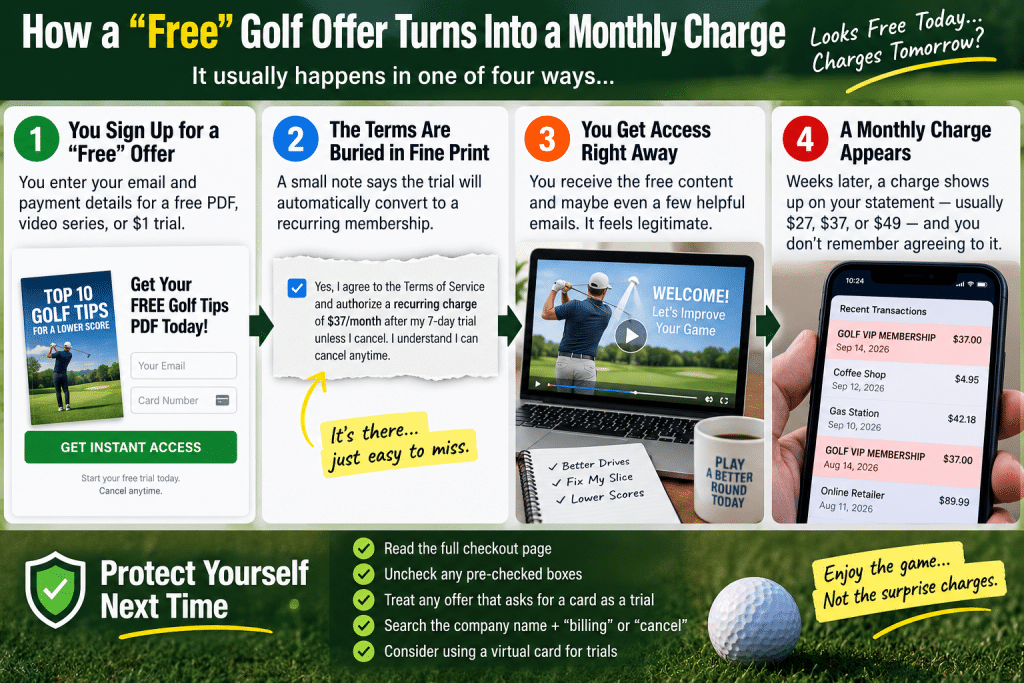
You downloaded a free PDF of golf tips. Maybe you claimed a “free” video series about fixing your slice, or a $1 trial of some swing program. Weeks later, a charge appears on your statement — $27, $37, sometimes $49 — from a company name you half-recognize, and there's no memory of ever agreeing to it.
You're not going crazy, and you're not careless. This is a designed outcome, and it's common enough across the online golf instruction and equipment space that most golfers who buy anything online will eventually run into some version of it.
Here's exactly how the mechanism works, how to reverse the charge, and how to spot the setup before it happens next time.
How the Charge Actually Happened
There are four common structures. Yours is almost certainly one of them.
The free-trial-to-paid conversion. You gave a card for a “free” or $1 trial. Buried in the terms is a clause stating the trial converts to a recurring membership after 7, 14, or 30 days unless you cancel. Legally, you consented. Practically, the conversion terms were in 8-point gray text below the button while the headline said “FREE.”
The pre-checked upsell box. At checkout for something else — a training aid, a video course, a putter — a box was already ticked adding a monthly “membership,” “vault,” or “insider club.” Unchecking it required you to notice it. Most people don't, because the eye goes to the total and the buy button.
The one-click post-purchase upsell. After you completed a purchase, a page appeared offering an add-on. Because your payment details were already captured, clicking “yes” completed a second transaction with no card entry and no second confirmation. Some golfers genuinely don't register that they made a second purchase at all.
The “free” shipping trial. You paid only shipping — $4.95 for a “free” gift or sample. The shipping charge is the consent mechanism; the terms attached enroll you in a monthly product or content subscription.
None of these require anyone to lie to you. They just require the disclosure to be technically present and practically invisible.
Step 1: Find Out Exactly What You're Enrolled In
Before you cancel or dispute anything, get the facts, because you'll need them for the refund conversation.
Look at your card statement and note the exact merchant descriptor — it's often a company you've never heard of rather than the brand you bought from, because many operators use a separate billing entity. Note the charge date and amount, and whether it has occurred more than once.
Then search your email for the original transaction: the confirmation receipt usually contains the actual terms, and it's your evidence that you were or weren't clearly told. Search your inbox for the brand name, “receipt,” “welcome,” and “trial.” Check spam.
If you can't identify the merchant from the descriptor, search the descriptor text itself online — other customers have almost always posted about the same charge.
Step 2: Cancel First, Refund Second
Order matters here. Cancel the recurring billing before you request a refund, because otherwise you can win a refund and still get charged again next month.
Log into the account (if you never created a password, use the “forgot password” flow with the email that received the receipt). Find billing or membership settings and cancel. Screenshot the cancellation confirmation screen, and save any confirmation email. That screenshot is the single most useful piece of evidence you can hold.
If there's no self-service cancellation — some operators deliberately require a phone call or email — send a written cancellation request by email even if they tell you to call. Written requests create a timestamped record; phone calls don't. Keep it short and factual: state your name, the email on the account, the charge date and amount, and that you are cancelling all recurring billing effective immediately.
Step 3: Request the Refund in Writing
Email support with a short, unemotional message. Effective ones include four things: what you were charged, that you did not knowingly authorize a recurring membership, that you have cancelled, and a specific request for a full refund of the charges.
Two details that materially improve your odds: reference their own advertised guarantee if they have one (“your site advertises a 30-day money-back guarantee”), and give a deadline (“please confirm within five business days”). Companies operating this model refund routinely, because refunding one customer is far cheaper than accumulating chargebacks — excessive chargeback rates threaten their ability to process cards at all.
Be firm and factual, not hostile. The person reading the email is a support rep with a refund button, not the person who designed the funnel.
Step 4: Dispute With Your Card Issuer If They Stall
If you haven't been refunded within about 5–7 business days of a written request, contact your bank or card issuer and dispute the charge.
Describe it accurately: an unauthorized recurring charge following a trial you did not knowingly agree to renew. Provide your cancellation screenshot, your refund request email, and the original order receipt. Ask the issuer whether they can also block future charges from that merchant, which is a separate action from disputing the existing one — this is the step that stops charge number three from arriving while the dispute is pending.
Dispute windows are limited (commonly 60–120 days depending on the issuer and network), so don't let this sit for months hoping it resolves itself.
Worth knowing: if you paid via PayPal, cancel the billing agreement inside PayPal as well, because cancelling on the merchant's site alone sometimes leaves the agreement active.
How to Spot the Setup Before It Happens
The prevention checklist, which takes about 90 seconds at checkout:
Scroll the entire checkout page before entering card details. Look for pre-checked boxes, and read anything in small or light-colored text near the buy button.
Treat “free” plus a card field as a trial, always. A genuinely free download does not require a payment method. If they want a card for something free, there's a conversion clause somewhere.
Read the button text, not the headline. Buttons like “Start My Trial” or “Get Instant Access” often carry the recurring terms directly beneath them.
Search the brand plus “billing” or “cancel” before buying. Two minutes of searching for the company name alongside those words surfaces existing customer complaints, if there are any.
Screenshot your order confirmation page. Free, instant, and it's the evidence that makes any later dispute straightforward.
Consider a virtual card number for trials, if your bank offers them. Many issuers let you create a card number with a spending limit or a single-merchant lock, which caps the damage from any auto-renewal.
What This Doesn't Mean
Fairness note: not every golf company that sells memberships is running a trap. Plenty of legitimate instruction sites, club-fitting services, and content platforms sell honest subscriptions with clear terms and easy cancellation, and a recurring model isn't inherently deceptive.
The distinguishing question isn't whether a company sells subscriptions — it's whether a reasonable person, moving at normal speed, would have understood they were signing up for one. Clear pricing above the button, an unchecked box, and a one-click cancel are the marks of an operator who's fine with you knowing what you bought.
The Bottom Line
The charge came from a trial conversion, a pre-checked box, a post-purchase upsell, or a shipping-only offer — all of which are designed to be technically disclosed and practically missed. Cancel first and screenshot it, request a refund in writing with a deadline, and dispute with your card issuer if there's no response in a week.
Then, going forward: any offer that says “free” while asking for a card is a subscription with a delay on it. Scroll the whole page, uncheck the boxes, and screenshot the receipt.
FAQ
Why did a golf website charge me monthly after a free trial? Almost certainly because the free or low-cost trial included terms converting it to a recurring membership after a set period unless cancelled. The other common causes are a pre-checked upsell box at checkout, a one-click post-purchase upsell that used your already-stored card details, or a “free gift” offer where paying shipping enrolled you in a monthly plan.
How do I stop recurring charges from a golf website? Cancel the billing inside your account first and screenshot the confirmation, since a refund alone won't stop next month's charge. If there's no self-service option, email a written cancellation request even if they ask you to phone. If you paid through PayPal, also cancel the billing agreement inside PayPal, as cancelling on the merchant site may leave it active.
Can I get a refund for a charge I didn't authorize? Often yes. Email support with the charge date and amount, state you did not knowingly authorize a recurring membership, note that you've cancelled, reference any advertised guarantee, and request a full refund within five business days. Companies using this model typically refund rather than risk chargebacks. If they don't respond, dispute the charge with your card issuer and ask them to block future charges from that merchant.
How do I avoid golf subscription traps in the future? Treat any “free” offer that asks for a card as a trial with a conversion clause. Scroll the entire checkout page looking for pre-checked boxes and fine print near the buy button, read the text directly under the button rather than the headline, search the brand name alongside “billing” or “cancel” before purchasing, and screenshot your order confirmation.